
View order fulfillment time
Metorik's Orders Report includes a fulfillment time metric that shows how long it takes for orders to move from created to completed status. This helps you track operational efficiency and identify bottlenecks in your fulfillment process.
Access the Orders Report at https://app.metorik.com/reports/orders.
View fulfillment time stats
The fulfillment time section displays a histogram showing the distribution of time between when orders were created and when they were marked completed.
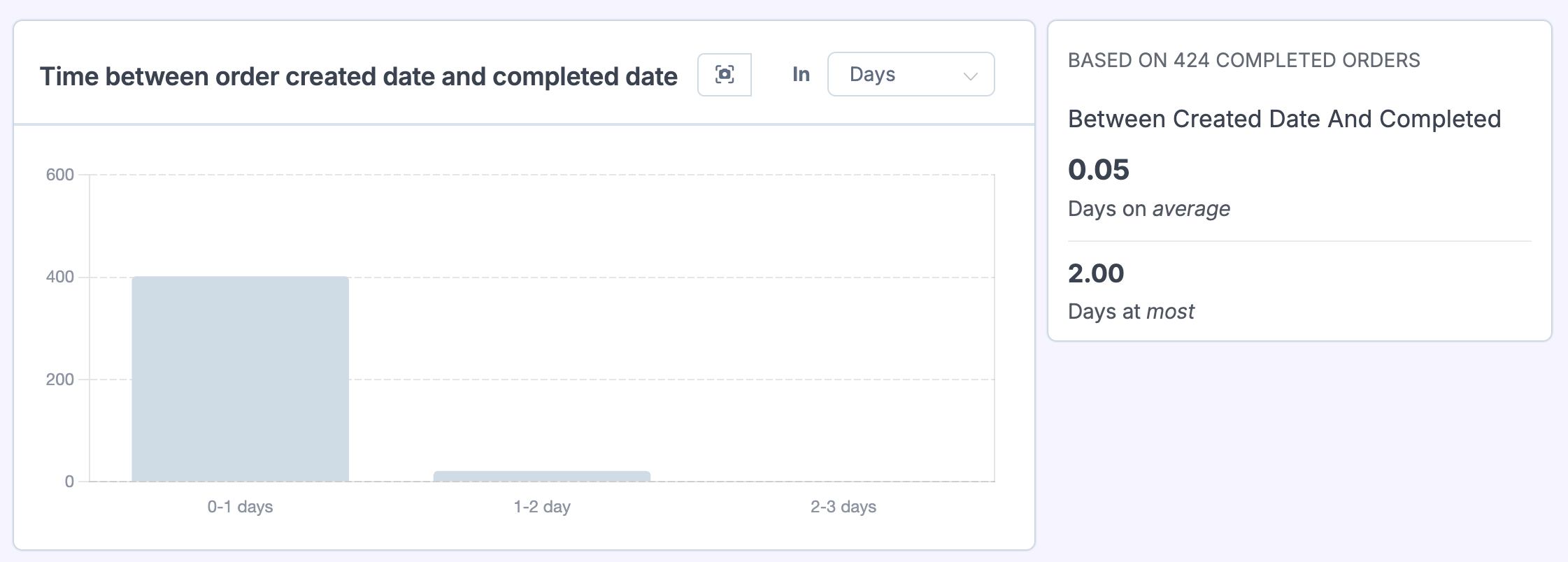
Check the histogram
The histogram breaks down your orders into time buckets—for example, 0–1 days, 1–2 days, 2–3 days. Each bar shows how many orders fell into that timeframe, giving you a clear picture of your typical fulfillment speed.
Review the summary stats
To the right of the histogram, you'll see:
Completed orders count – The number of orders included in the calculation
Average fulfillment time – The mean time between created and completed dates
Maximum fulfillment time – The longest time any order took to complete
Change the time unit
Use the unit selector (Days, Hours, etc.) to view the data in the granularity that makes sense for your business. Stores with same-day fulfillment may prefer hours, while others may find days more useful.
Only completed orders are included: This metric only counts orders that have a completed date. Pending, processing, or cancelled orders are not included in the calculation.
What this measures
Fulfillment time is calculated as the difference between the order's created date and its completed date. This captures the full journey from when a customer placed the order to when it was marked completed in your store.
For WooCommerce stores, the completed date comes from the order status changing to "completed." For Shopify stores, it's based on the fulfillment status. Learn more about date types in WooCommerce: Order Date Types.
Filter by segment
Use Metorik's Segmenting Tool to filter the fulfillment time stats by product, shipping method, customer segment, or any other criteria. This helps you identify whether certain products or customer types have longer fulfillment times.