
Metorik lost the permissions or connection it needs. Click Reconnect to restore them, then sync again.
Ad Audience Syncing
Ad Audiences let you turn Metorik segments into ad-platform audiences on Facebook, Google Ads, TikTok, Pinterest, Snapchat, and Reddit. Build an audience from customers, orders, subscriptions, or carts using the same filters you already use in Metorik, then sync it to the platform you choose.
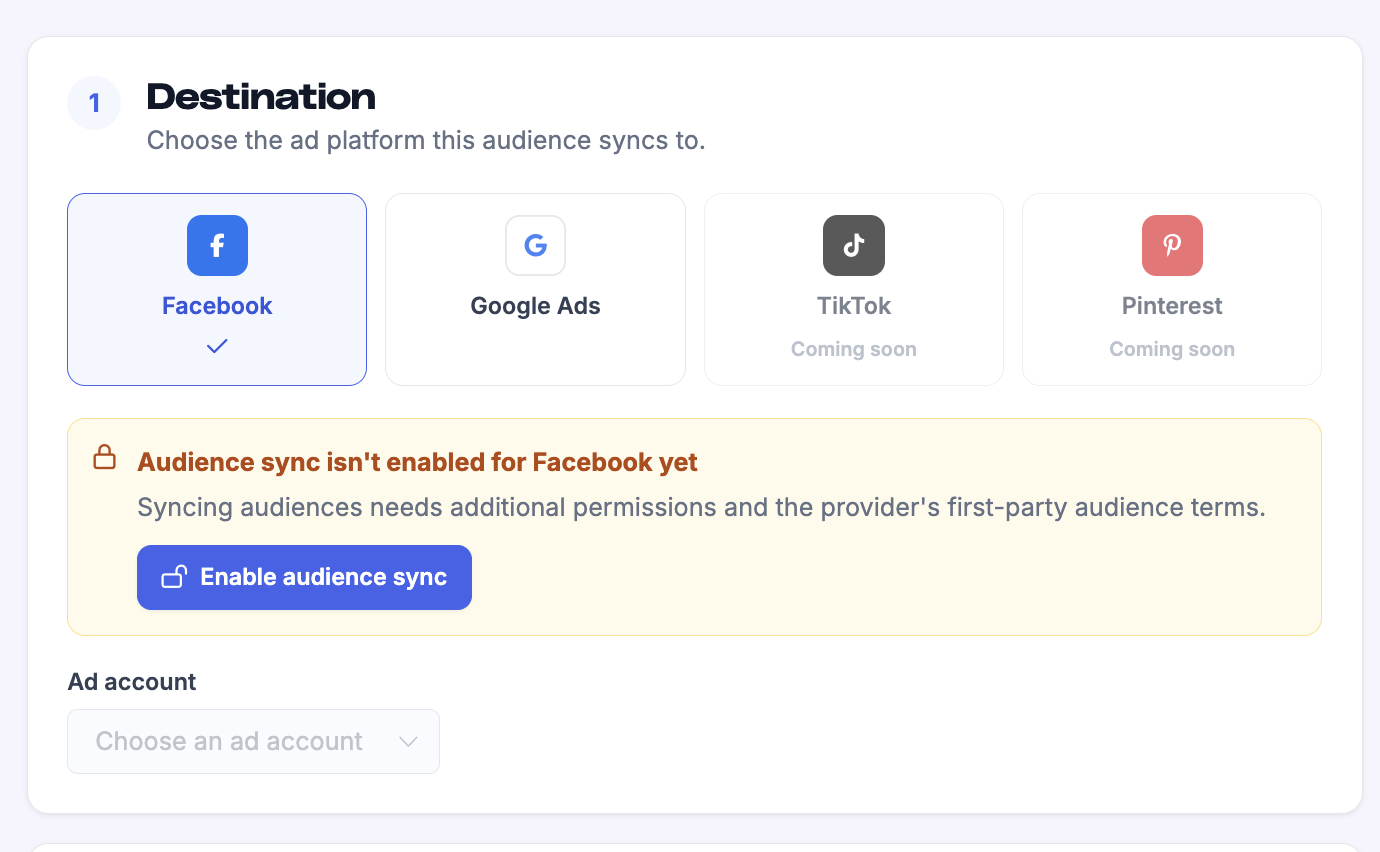
Enable audience sync for Facebook
You need a Facebook integration connected to your Metorik store. If you only use it for ad cost reporting, you must grant the additional Ads Management permission for audience syncing and accept Facebook's Custom Audience terms.
Go to Engage → Ad audiences → Integrations.
Select Facebook as the destination.
Click Enable audience sync and grant the Ads Management permission.
Your existing Facebook ad cost reporting can stay connected; audience sync only needs the extra permission.
Enable audience sync for Google Ads
Go to Engage → Ad audiences and click + New audience.
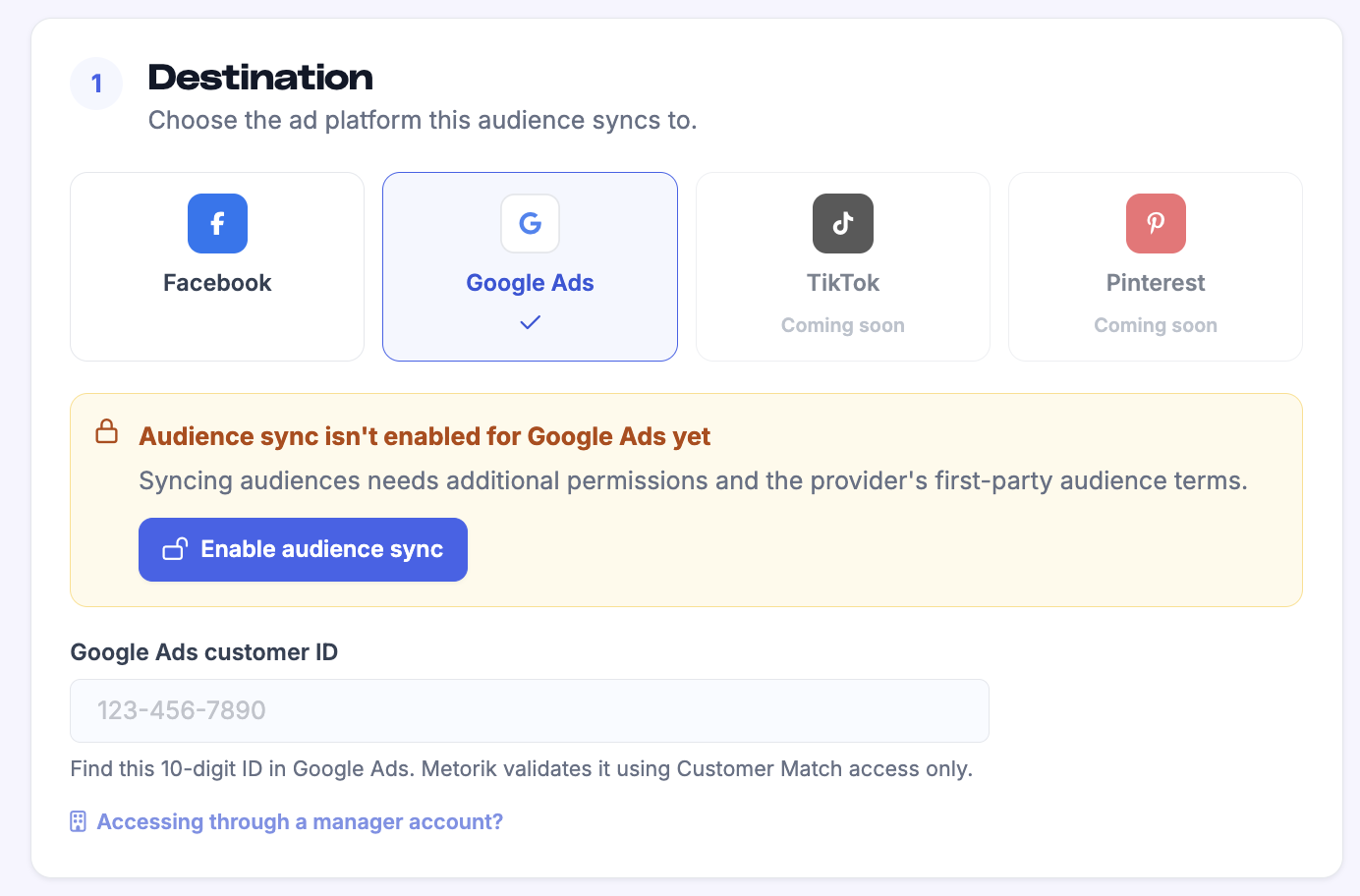
Select Google Ads as the destination.
Click Enable audience sync and grant the required permissions.
Enable audience sync for TikTok or Pinterest
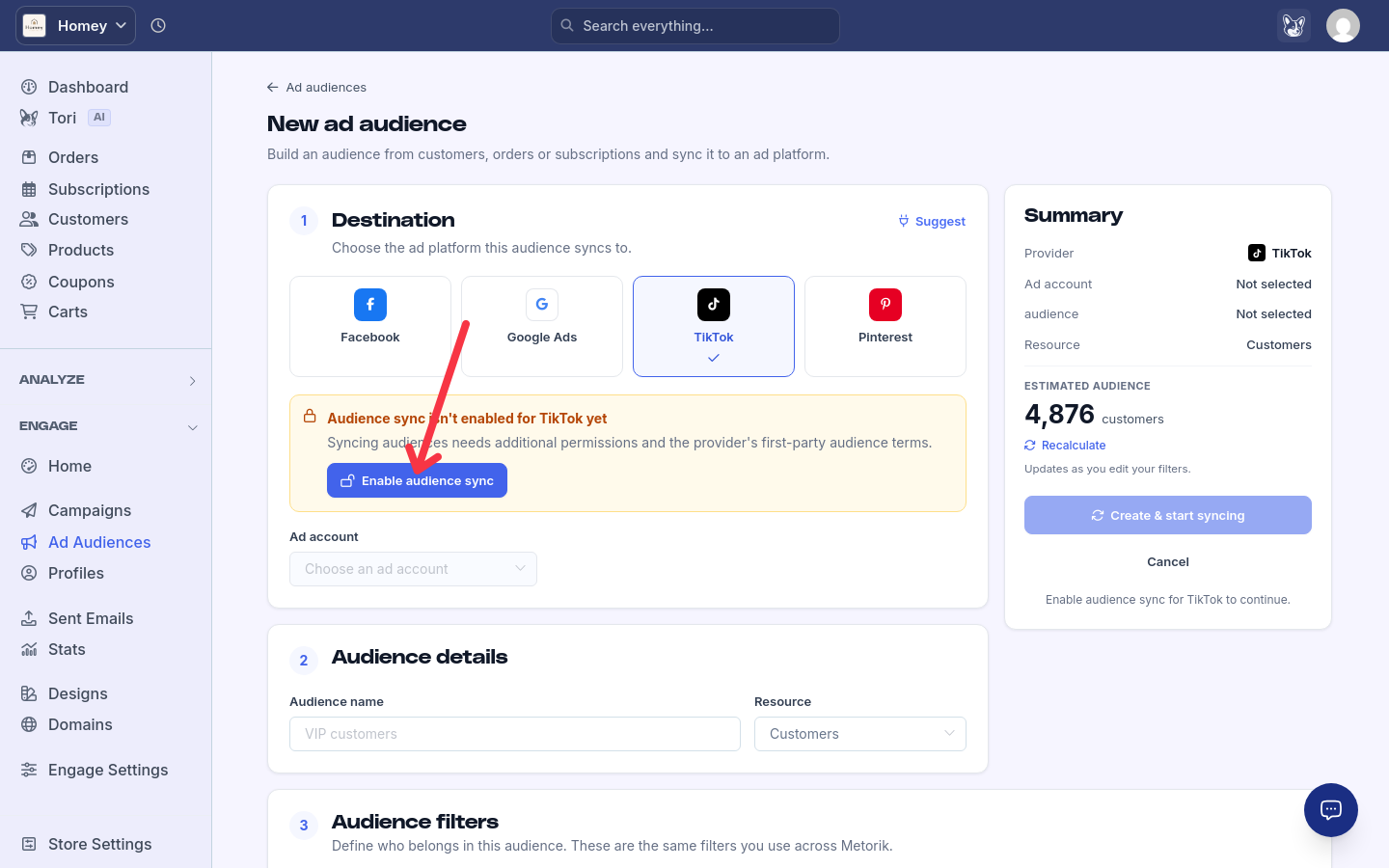
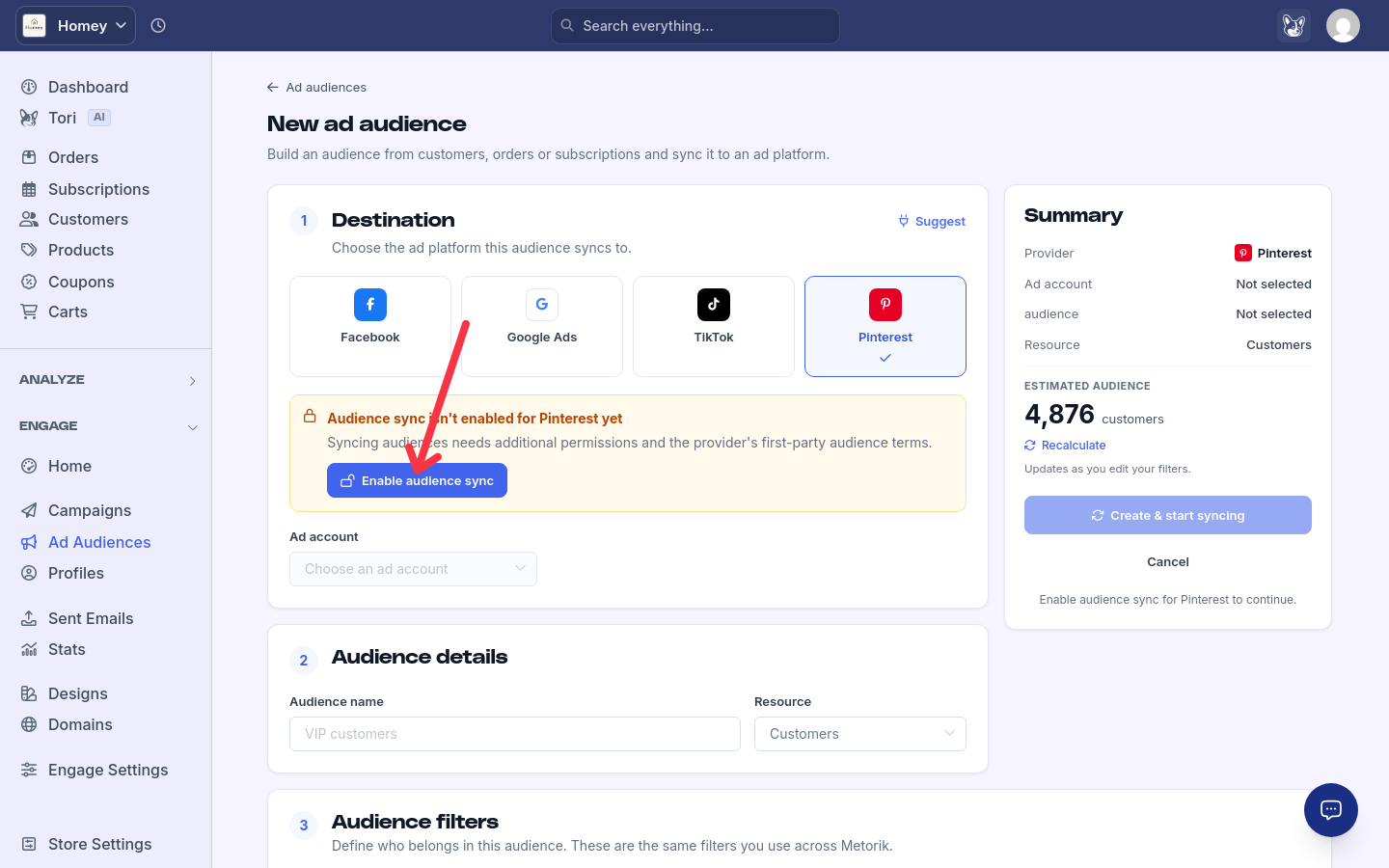
Setup is the same for both platforms: you enable audience sync from the new audience page, approve the provider's audience-management permissions, then pick an ad account.
Go to Engage → Ad audiences and click + New audience.
Select TikTok or Pinterest as the destination.
Click Enable audience sync and approve the audience-management permissions.
Metorik returns you to the audience page and enables syncing automatically when the required permissions were granted. Then select an accessible ad account.
Enable audience sync for Snapchat
Snapchat audiences are set up from the new audience page and, like the other destinations, sync every six hours.
Go to Engage → Ad audiences and click + New audience.
Select Snapchat as the destination.
Connect or enable audience sync when prompted, then select your ad account.
Create a new audience or choose an existing one.
Enable audience sync for Reddit
Connecting Reddit requires opting in to audience syncing, accepting Reddit's first-party terms, and granting the adsread and adsedit permissions.
Go to Engage → Ad audiences and click + New audience.
Select Reddit as the destination.
Opt in to audience syncing, accept Reddit's first-party terms, and grant the adsread and adsedit permissions.
Create a new Reddit Customer List or select an existing one.
Reddit audiences sync every six hours and support both Add and remove and Add only syncing. Reconnecting Reddit preserves your existing advertising-cost selections and history.
Using a connection that only does ad cost reporting
A connection you already use for ad cost reporting may lack the permissions audience syncing needs. Metorik asks you to reconnect before audience setup can continue. If the required permissions are already present, Enable audience sync activates syncing without another OAuth connection.
Ad-cost account selection is separate from audience syncing. Reconnecting clears previous account selections, so if you use ad cost reporting, check your account selections in the integration settings afterwards.
How TikTok and Pinterest differ
Both platforms upload SHA-256 hashed email addresses only, and members without an email are skipped. The audience preview reflects email eligibility. The minimums below count members Metorik uploads, not the platform's eventual matched audience size.
TikTok | ||
|---|---|---|
Data uploaded | SHA-256 hashed email addresses only | SHA-256 hashed email addresses only |
Minimum for creating a new audience | 1,000 email-bearing members | 100 email-bearing members |
Existing destinations offered | Customer-file audiences owned by the selected advertiser; shared audiences excluded | Customer-list audiences |
Create an ad audience
1
Choose the destination
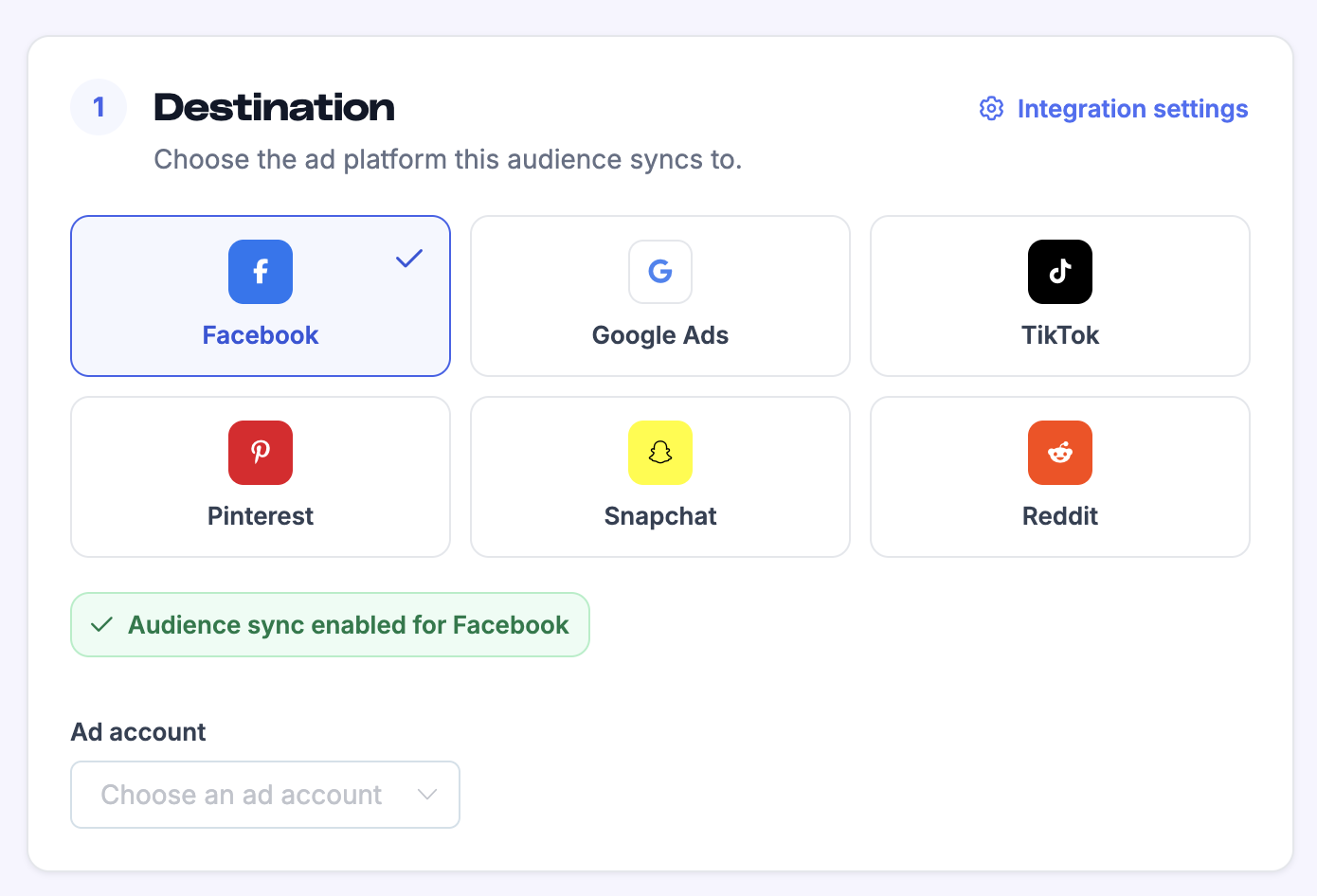
In Engage → Ad audiences, click + New audience and choose the ad platform this audience syncs to: Facebook, Google Ads, TikTok, Pinterest, Snapchat, or Reddit.
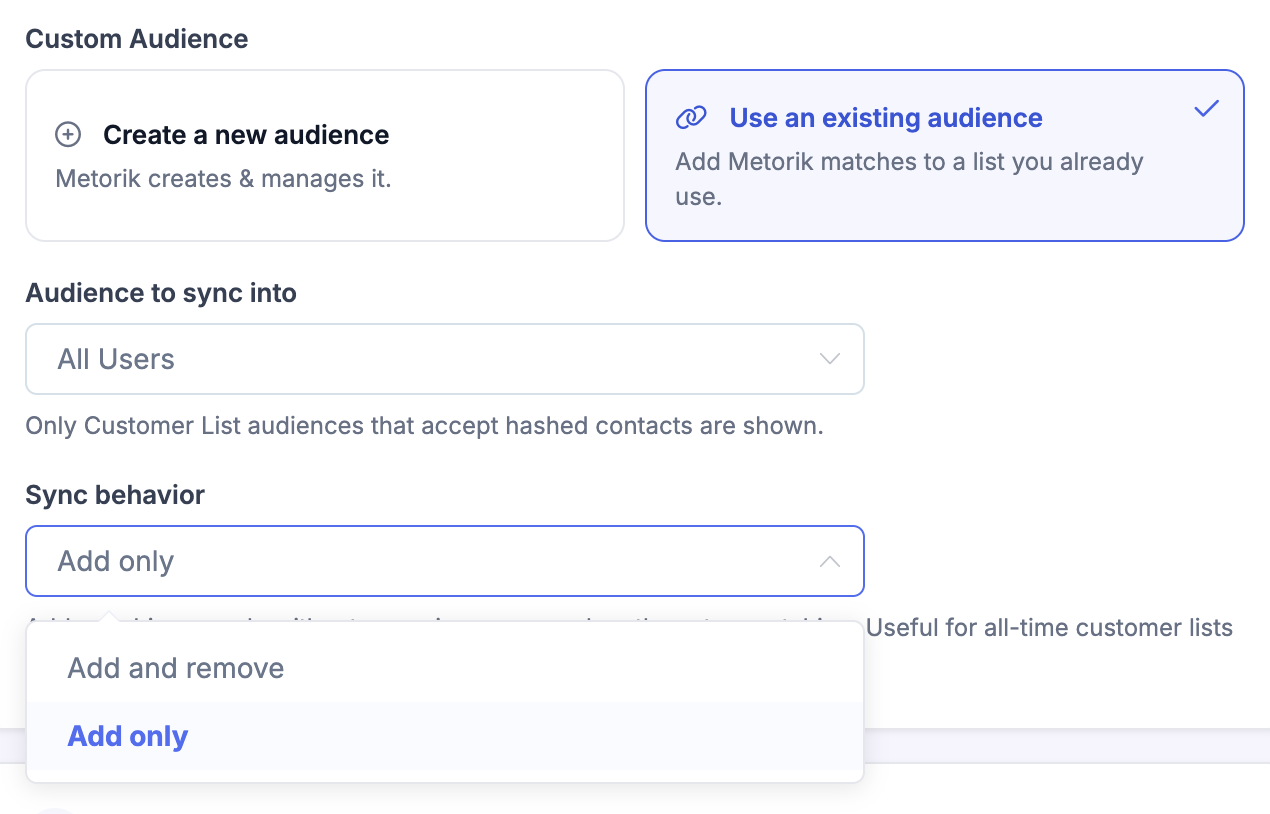
Facebook: select your Facebook ad account and choose whether to create a new Custom Audience or sync into an existing one. When you create a new audience, Metorik names it Metorik · Audience name in Facebook.
Google Ads: select your Google Ads account from the dropdown list (or enter its Google Ads customer ID manually if it isn't shown). If you access this customer account through an MCC or manager account, click Accessing through a manager account? and enter the optional Manager account ID.
TikTok: sync into a customer-file audience owned by the selected advertiser (shared audiences aren't offered), or create a new one with at least 1,000 email-bearing members.
Pinterest: sync into a customer-list audience, or create a new one with at least 100 email-bearing members.
Snapchat: connect or enable audience sync when prompted, select an ad account, then create a new audience or choose an existing one.
Reddit: create a new Reddit Customer List or select an existing one.
2
Set audience details
Enter an Audience name and choose a Resource: Customers, Orders, Subscriptions, or Carts.
Choose a sync mode: Add and remove (the default) or Add only. With Add only, Metorik never removes people from the audience/list.
3
Apply filters
Use the same filter builder you use across Metorik to define who belongs in the audience. You can also load an existing segment or use AI to generate filters.
The sidebar shows an estimated audience count and recalculates as you edit.
4
Start syncing
Click Create & start syncing. Metorik queues the first sync immediately.
Audience filters work the same way as Metorik segments. If you need help building filters, see Segmenting Data and Types of Segmenting.
Sync carts into an audience
Carts are available as a resource on every destination: Facebook, Google Ads, TikTok, Pinterest, Snapchat, and Reddit. Selecting Carts initially applies an abandoned-cart filter, which you can edit with the existing cart filters.
Carts use the email or phone captured on the cart, falling back to the linked customer when neither was captured. Metorik deduplicates people across matching carts, so a shopper with several matching carts is added once.
Add and remove: a recovered shopper leaves the audience after their last matching cart stops matching.
Add only: recovered shoppers stay in the audience once added.
Eligible phone-only guest carts are included for Facebook, Google Ads, and Snapchat. Email-only destinations (TikTok, Pinterest, and Reddit) continue to require email.
How syncing works
Metorik recalculates and updates the connected audience every 6 hours. How matching people are handled depends on the audience's sync mode.
Add and remove (the default): new or changed people are added, people who no longer match are removed, and unchanged people are left alone.
Add only: people who match are added, and no one is ever removed from the audience/list.
Use Add only when you add people to the same audience/list from multiple sources, like an all-time purchases list where people aren't removed but still need to be added from other places.
When you sync into an existing audience, the first sync is additive only. After that, Metorik only removes contacts it previously synced, so the same audience/list can still be used by other sources.
Metorik deduplicates matching records into people and hashes identifiers before upload. For Facebook and Google Ads, Metorik sends the hashed customer data needed for matching, such as email, phone, name, location, postcode, country, and an external ID. TikTok and Pinterest upload SHA-256 hashed email addresses only.
For Google Ads, processing the audience can take up to 48 hours initially. After that, Metorik still syncs every 6 hours.
TikTok audience minimum
TikTok requires at least 1,000 email-bearing members to create a new audience, and the 1,000 minimum applies to the audience overall. Metorik recalculates every 6 hours and small additions and removals go directly to the TikTok API. When TikTok rejects a change, Metorik records it as a sync error on the audience detail page.
Manage an audience
From the Ad audiences list, click any audience to open its detail page.
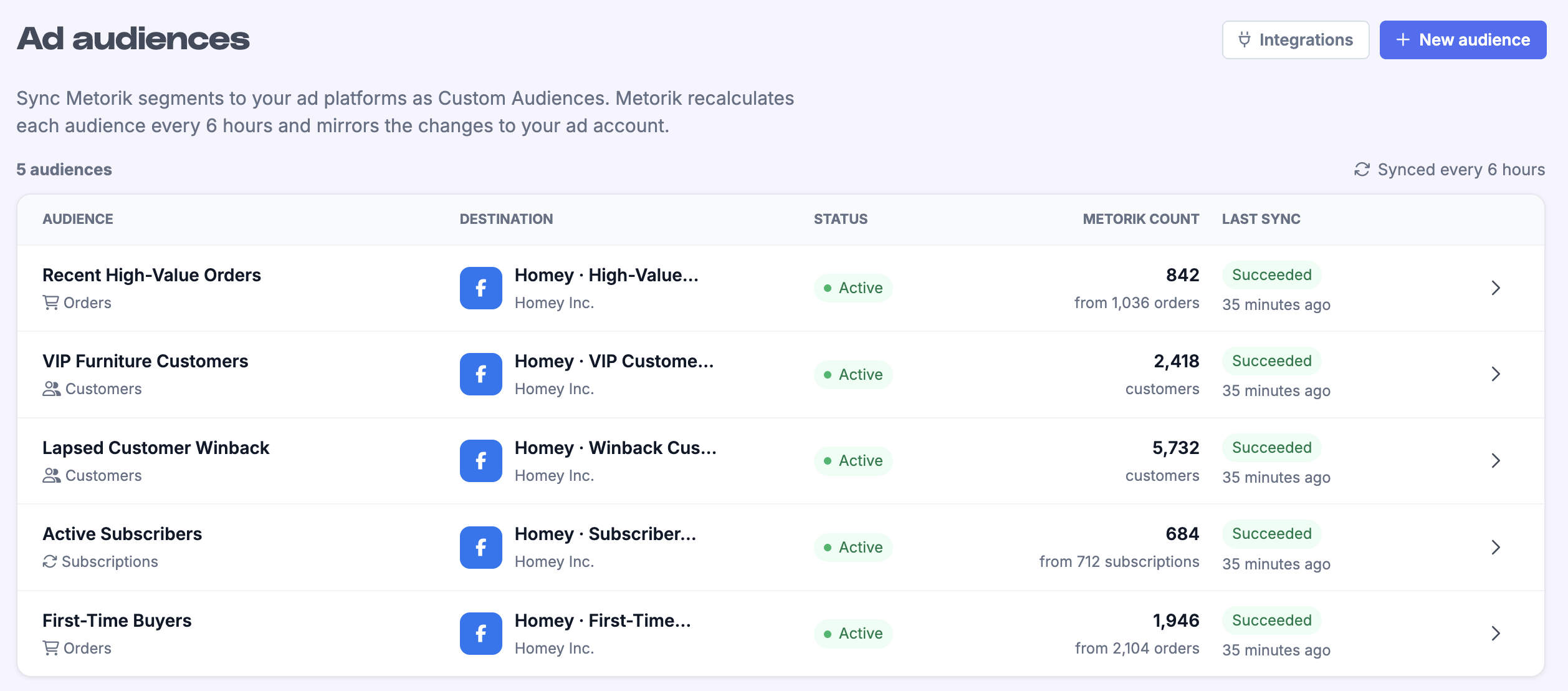
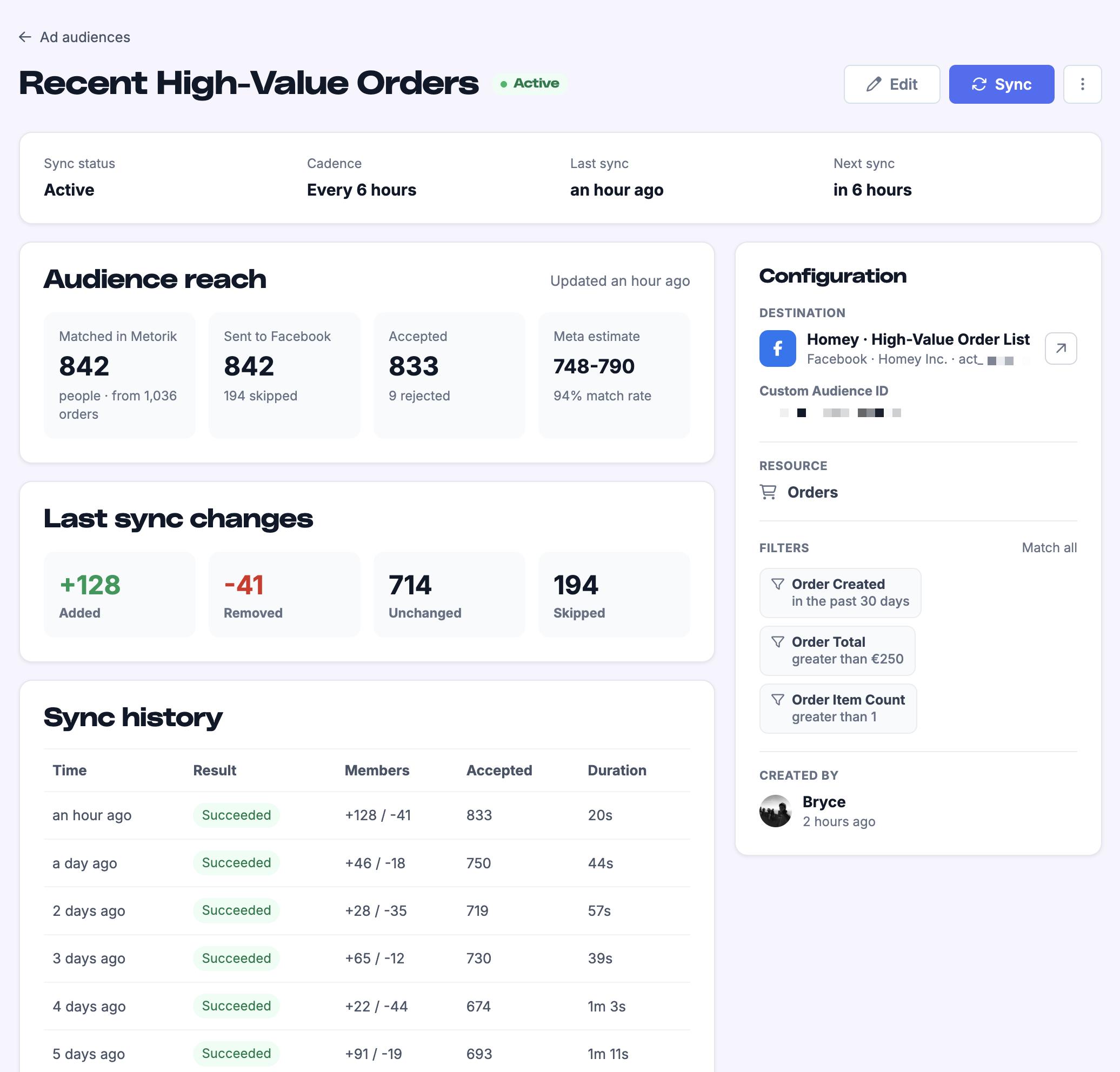
You can view:
Sync status and next scheduled sync
Metorik audience size and accepted/rejected counts
The ad platform's estimated matched audience size
Sync history with added, removed, unchanged, and skipped counts
Available actions include:
Sync now — run a manual sync
Refresh estimate — update the matched audience estimate
Pause / Resume — stop or restart scheduled syncing
Duplicate — copy the audience setup
Archive — stop future syncing without deleting the connected audience/list
Archiving an audience in Metorik stops future syncing but does not delete the connected audience/list.
Fix a failed or stalled sync
When a sync fails, the audience status changes to Needs attention and Metorik offers the recovery action that matches the cause: Reconnect for permission or token problems, Edit audience for an undersized initial audience, and Retry sync for other failures.
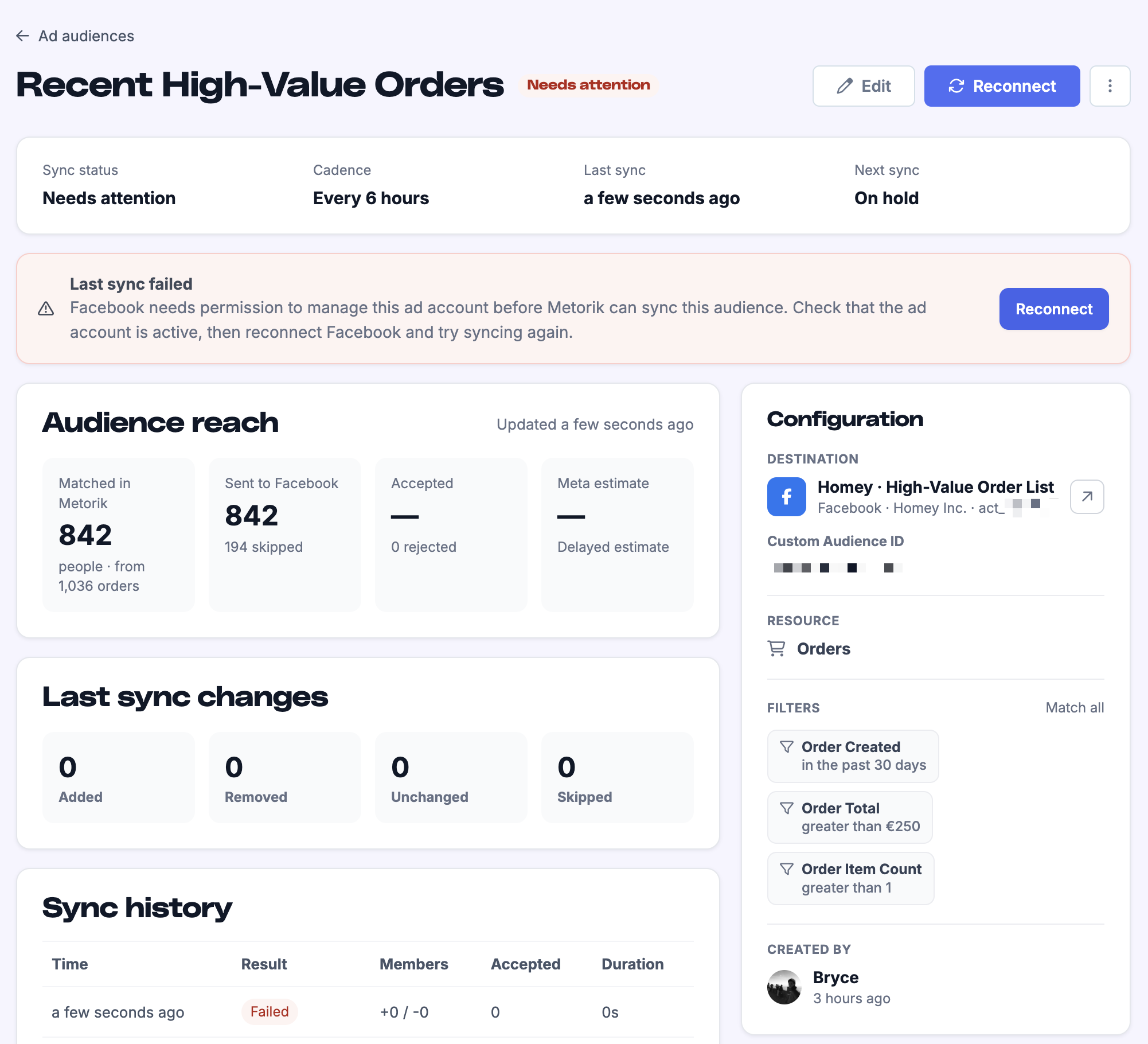
Sync fails with a permissions or connection error
The audience or list was deleted on the ad platform
Edit the audience and choose an existing destination or create a replacement one.
The initial audience is below the provider minimum
TikTok needs at least 1,000 email-bearing members and Pinterest at least 100 before Metorik can create a new audience. Click Edit audience and broaden the filters to bring more email-bearing members in.
The sync failed for another reason
Check that the ad account is still active, then click Retry sync.
The matched audience estimate may be delayed, returned as a range, or temporarily unavailable. This does not necessarily mean the sync failed; try refreshing the estimate after a short wait.
Was this helpful?
Was this helpful?