The initial historical sync can take a few minutes. If your campaigns only launched recently, there may also be little historical data to sync. OpenAI's reporting can additionally lag by up to a day or two, so today's spend may not appear immediately.
Connect OpenAI Ads (ChatGPT Ads)
Using Metorik's costs and profit system, you can sync your daily advertising costs from OpenAI Ads (ChatGPT Ads) directly into Metorik. Once connected, your ChatGPT Ads spend flows into your cost and profit reports alongside your other advertising channels, so you can see the true return on the channel — profit, not just revenue.
This works for both Shopify and WooCommerce stores.
What syncs
Daily ad costs from your OpenAI Ads account, synced via the OpenAI Ads API. Costs sync historically when you first connect, and then automatically every 15 minutes going forward. Costs appear throughout Metorik: your advertising cost reports, profit reports, dashboards, and email/Slack digests.
Like our other advertising integrations, ChatGPT Ads costs are stored and calculated on an overall daily basis — unlike product or shipping costs, which are stored per-order.
Connecting OpenAI Ads to Metorik
You'll need to be a store admin in Metorik to configure advertising costs.
In your OpenAI Ads account, go to https://ads.openai.com/settings and generate an API key.
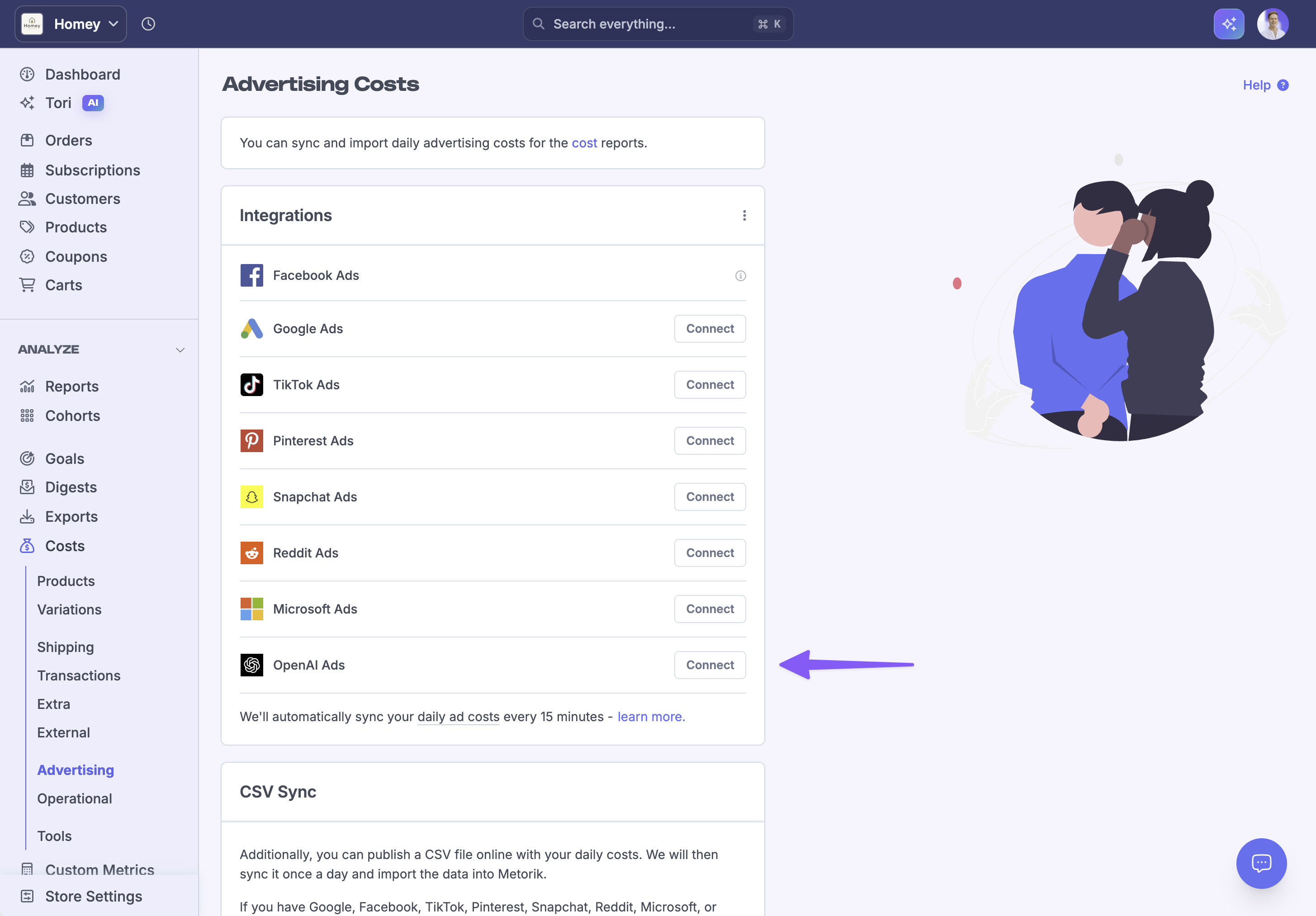
In Metorik, go to the advertising cost settings page.
Click the Connect button next to OpenAI Ads.
Paste your API key into the connection form and confirm the account you'd like to sync from.
Syncing will begin right away. We'll sync your historical ad costs first, and then keep new daily costs up to date automatically.
Currency conversion
If your OpenAI Ads account uses a different currency from your store's currency in Metorik (for example, your OpenAI Ads account is in USD but your store's currency in Metorik is AUD), we will automatically convert and store the ad costs in your store's currency in Metorik.
Where you'll see ChatGPT Ads costs
After connecting, your ChatGPT Ads spend will appear:
On the advertising costs page, broken down by day alongside Google, Meta, TikTok, and your other connected channels.
In your profit reports, where it's included in your net profit calculation together with COGS, shipping, transaction fees, and operational costs.
In your dashboard and any digests you have scheduled to email or Slack.
Troubleshooting
I connected but don't see any costs yet
My API key isn't being accepted
Double-check the key was copied in full from https://ads.openai.com/settings, with no extra spaces. If it still fails, generate a fresh key and try again. If you're still stuck, contact us and we'll take a look.
I need to change the connected account
You can disconnect the OpenAI Ads integration from the advertising cost settings page and reconnect with a different API key at any time.
Related documentation
Syncing Advertising Costs — overview of all supported ad platforms, plus CSV syncing.
Setting Costs in Metorik — how Metorik's cost and profit system works.
Operational Costs — track fixed costs like rent, salaries, and software.
Was this helpful?
Was this helpful?