
Data Syncing
Metorik attempts to sync data with your store in real-time, including but not limited to:
Orders
Customers
Products
Variations
Categories
Coupons
Subscriptions (WooCommerce only)
It does this in a few ways:
Import - Initially when you add your store, it syncs all of your data through a bulk import.
Webhooks - Whenever an event happens on your store, like an order is created or a customer is updated, your store sends a notification to Metorik about it. These can fail though when there are issues on your site or if you have a big store. Technically, you can disable them if you have a large WooCommerce store.
Background Syncing - Metorik has a very efficient way to check for missing and outdated data. You can change how often this runs in your connection settings. Issues with updating? Check this help doc.
Sync frequency (WooCommerce)
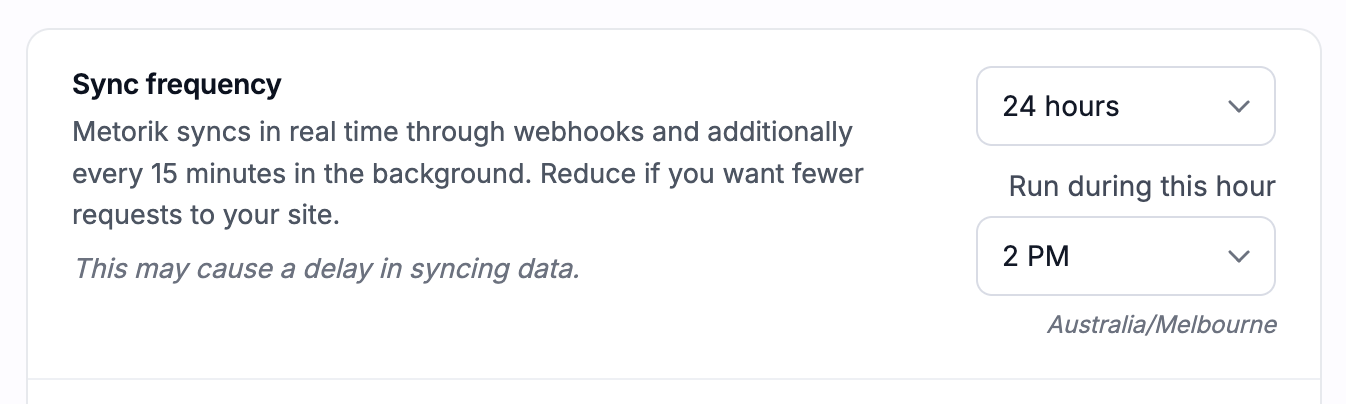
For WooCommerce stores, you can change how often Metorik checks for missing or outdated data in Settings → Stores → Connection. The default is every 15 minutes. You can also choose 1, 2, 4, 8, or 24 hours.
If you choose 24 hours, select the hour when the daily background sync should run. This uses your store's time zone and runs once during that hour each day.
Webhooks can still sync changes as they happen; this setting controls the scheduled background checks. With daily syncing, changes missed by webhooks may take until the next daily check to appear. You can use Force a data sync in the connection settings whenever you need an immediate check.
WooCommerce users:
You will need to keep the Metorik Helper plugin installed and active on your site to ensure all data is synced.
Shopify users:
You're good to go, no need to install anything else!
If it seems like your data is not syncing and you want us to check, please send us a message and we'll take a look right away.